SECURITY SEARCH - MACROAXIS
This widget enables you to search global equities, funds, etfs, bonds as managed by Macroaxis. INSTRUCTIONS
GOOGLE SEARCH:  If you want to look for additional information regarding economic and financial data and news of equities, industries, other securities, economies, currencies and other activities you may use the GOOGLE SEARCH tool to search these items directly by this website. If you want to look for additional information regarding economic and financial data and news of equities, industries, other securities, economies, currencies and other activities you may use the GOOGLE SEARCH tool to search these items directly by this website. |
 STOCKS PROFILES: Integrated chart with technical and fundamental data, indicators and information of stocks traded in world public markets. In the charts there are some predefined technicals buy you may add or change other indicators. Besides, this charts offer fundamentals of traded stocks with the financial statement data, dividends, quotes data, value multiples, key statistics. STOCKS PROFILES: Integrated chart with technical and fundamental data, indicators and information of stocks traded in world public markets. In the charts there are some predefined technicals buy you may add or change other indicators. Besides, this charts offer fundamentals of traded stocks with the financial statement data, dividends, quotes data, value multiples, key statistics. | |||
 WSJ STOCK PROFILE & FINANCIALS: This link gives the access to the data published by Wall Street Journal online reporting the financials of World listed stocks. In the entry page there are the financials of Amazon Inc., but it's possible to have access at the financials of other stocks writing their names in the search area. WSJ STOCK PROFILE & FINANCIALS: This link gives the access to the data published by Wall Street Journal online reporting the financials of World listed stocks. In the entry page there are the financials of Amazon Inc., but it's possible to have access at the financials of other stocks writing their names in the search area. |
INSTRUCTIONS OF MACROAXIS SEARCH WIDGET
Search of a specific security
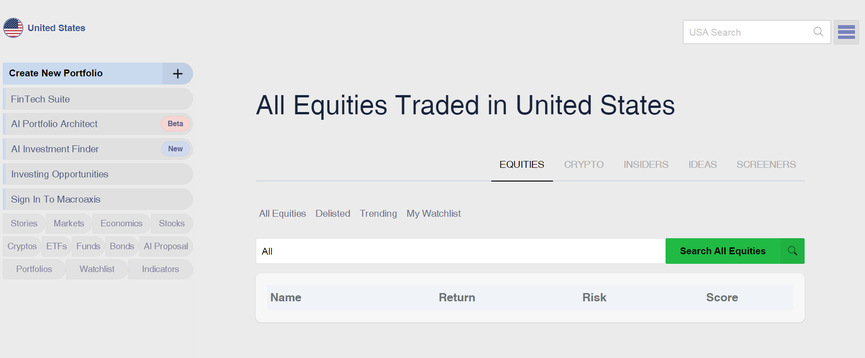
To get the data of a specific security provided by Macroaxis, you have to open its General Search Page either to type the name of the issuer (industrial or financial company, bank, institution, government) or to click on the "Search" button.
Afterwards, at the top of the page on the left side, you have to select the country in which the security is traded.
Then you may:
a) Type the name of the issuer / security on the right side at the top of the page;
b) First type the type of searched asset (stock, bond, etf, fund, crypto or other as reported on the left side of the page; then type the name of issuer/security in the area under the flag images of the International market counties.
Search of all securities of a type of securities listed in a specific market
Type on the "Search" command and you open the general search page of Macroaxis.
Afterwards, press on the type of asset class (Stocks, Cryptos, ETFs, Funds, Bonds) / data (Stories, Markets, Economics) you want to analyze as indicated on the left side of the page.